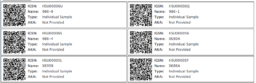

Label Template
The labels are sized for a 10 row, 2 column, portrait layout of 4″x1″ labels.
- Label template (.doc)
- More information about label layout OL75
How to print IGSN labels
- In MySESAR, select the labels you want to print in the right-hand-most column of the My Samples page. You may click the “select all for print” link to select all samples on a page.
- Click the “print selected” button.
- On the new page that displays the labels, click the “Save to PDF File” button.
- When printing the saved .pdf, set the paper type as A4, left and right margin should be 1 inch. (We suggest printing a test page first before printing on the labels.)